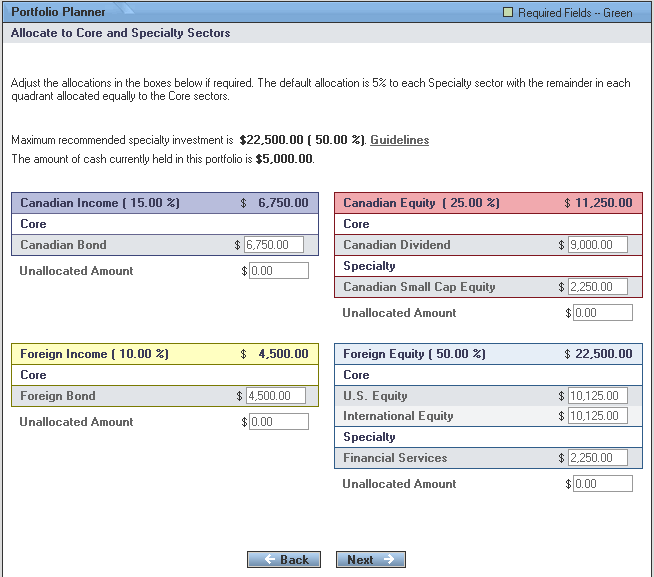
The "Allocate to Core and Specialty Sectors" screen allows you to make allocations to the Core and Specialty sectors that have been selected in the previous screen.
The screen displays:
The maximum recommended for specialty investments in dollars and percent
The amount of cash held, and
All the selected sectors.
The screen opens with an allocation box next to each selected sector. It displays the following recommended default allocations:
5% of the total investment amount is allocated to each selected specialty sector.
The remaining amount in the quadrant is allocated equally to the selected core sectors.
Allocation to the balanced sectors is distributed evenly among all the selected sectors.
The default sector allocations can be changed using the following procedure:
Replace the default allocation in the input box next to the sector name.
The sum of the allocations made to all sectors in a quadrant must add up to the $ amount specified for the quadrant.
Continue the allocation until the "Unallocated Amount" for each quadrant equals zero
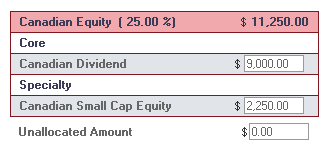
Use the guidelines link to help determine the minimum and maximum allocation to individual sectors
Determine if the total specialty amount exceeds the recommendation and make adjustments if desired
When sector allocation is completed, click the "Next" button to continue to the "Select Securities" screen
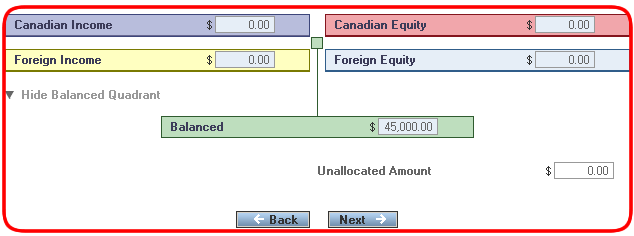
If sectors have been selected in the Balanced quadrant in the previous screen, then you will automatically be presented with those Balanced Sectors on this screen. The quadrant's allocation will be distributed evenly among all sectors when the screen opens, but these can be adjusted as desired.
The sum of the allocations made to each of the sectors must add up to the % or $ amount specified for the entire quadrant.
Here is an example where 100% has been allocated to the Canadian Balanced sector in the balanced quadrant.
Allocation to Sector Guidelines