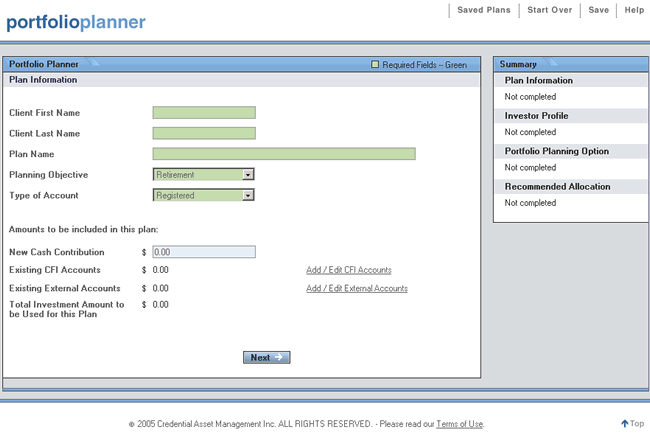
The "Plan Information" screen appears in the page content area when a new plan is started or an existing plan is opened. This screen provides input fields that are used to identify the plan when it is saved, and to enter plan information such as:
Client First Name
Client Last Name
Plan Name
Planning Objective
Type of Account
New Cash Contribution
Existing Credential Financial Inc. (CFI) Accounts
Existing External Accounts
Total Investment Amount to be Used for this Plan
Complete all the fields and click "Next" to continue to the "Investor Profile" screen
|
Client First Name
|
The "Client First Name" should be entered in a format that is appropriate for customizing reports and identifying a saved portfolio plan. |
|
Client Last Name
|
The "Client Last Name" should be entered in a format that is appropriate for customizing reports and identifying a saved portfolio plan. |
|
Plan Name |
The "Plan Name" should be entered in a format that is appropriate for customizing reports and identifying a saved portfolio plan. |
|
Planning Objective |
The "Planning Objective" refers to the intended use or purpose of the investment. The choices are:
|
|
Type of Account |
"Type" identifies whether the account is registered or not registered under the Income Tax Act. This field needs to be filled in accurately to ensure that tax consequences are considered. |
|
New Cash Contribution |
"New Cash Contribution" is the amount that is being contributed to this specific plan. Enter the amount with or without the decimal. If no decimal is entered it will be assumed to be zero. |
|
Existing CFI Accounts |
"Existing CFI Accounts" are other investments held by the client in Credential Financial Inc. account(s). You have the option of either which of these accounts' investment amounts are to be included in the current plan.
Click on the "Add/Edit CFI Accounts" link to open the Worksheet to enter existing investment details. The totals are saved and displayed on this screen. |
|
Existing External Accounts |
"Existing External Accounts" are other investments held by the client in account(s) at other institution(s). You have the option of either which of these accounts' investment amounts are to be included in the current plan.
Click on the "Add/Edit External Accounts" link to open the Worksheet to enter existing investment details. The totals are saved and displayed on this screen. |
|
Total Investment Amount to be Used for This Plan |
The "Total" is automatically calculated and carried forward to the next screens. It is the sum of:
The minimum amount that can be used to do a portfolio plan is $500.
|